
Somewhere in your parents' house, there is a folder. Two passbooks, one from a branch that shut down years ago. A policy nobody has read since the day it was signed. Your family knows the folder exists. They don't know if it's complete.
Now think about your own version of it. A salary account here, an old fund started through a friend, a term plan bought online at midnight. Each one changes on its own schedule, so whatever list your family has quickly goes out of date.
1FCode helps consolidate your liquid accounts, policies, nominee details, and legal instructions into one view, so you can organise, protect, and pass on your life's work in one place.
This blog explains how you can build a legacy through 1FCode, how its features work together, and how it supports legacy planning and management for your wealth and other assets.
What is 1FCode as a Platform?
1FCode is built around a personal financial profile that holds both connected and manually added records. You can automatically sync supported banks, stocks, mutual funds, and insurance accounts through a consent-based Account Aggregator. For unlinked assets, you can add the relevant details manually.
Once added, 1FCode organises your assets into a dashboard grouped by category. You can review category-wise figures, your overall net worth, and the information recorded under each one. You can also update or remove manual records anytime.
But static numbers are only half the story. The platform also helps you stay on top of your wealth by letting you manage risk profiles, log nominee and Will details, and reach human support during fraud or financial emergencies.
Updating these details keeps your record current, so what your family finds later reflects where things actually stood, not where they stood three years ago.
How Can You Build Your Legacy with 1FCode?
1FCode helps you build different parts of your wealth portfolio, with each category serving its own purpose:
1. Bank Accounts
Bank accounts show the cash side of your financial position. By including these balances alongside your investments and insurance, 1FCode avoids presenting a portfolio view that begins and ends with market-linked assets.
- Automatically connect bank account/s
- Add an account manually when it cannot be linked
- Review linked banks and manual records separately
So your cash position sits in the same record as everything else, and nobody has to guess which bank held what.
2. Investments Across Different Instruments
Stocks and mutual funds have separate sections in the platform. You can connect supported providers or enter a holding manually with its share count and value.
- Manual stock entries can include the provider, share count and value
- Supported stock and mutual fund providers can be linked directly
- Manual records can be viewed, edited, or deleted later
Nothing has to sit in an account only you know about. Every holding you add is recorded in one place your family can find, which means they're less likely to discover an investment only after it's too late to act on it.
3. Insurance Policies and Coverage
Insurance often stays out of sight until a premium is due or a claim is made. 1FCode keeps your policy details within your financial profile.
- Record the insurer, policy number and sum assured
- Keep linked and manually added policies in separate lists
- View, update or remove a policy whenever required
So your family isn’t left discovering a policy exists only when a claim needs to be filed.
4. Net Worth, Goals and Risk Profile
Net worth is calculated from all values across your connected categories, like bank balances, stocks, mutual funds, and insurance, into a single total. Sitting next to it is a risk profile you can reassess through a short quiz whenever your situation changes.
- See bank, stock, mutual fund, and insurance values separately
- Include both linked and manually entered records in the calculation
- Retake the risk-profile quiz when your situation changes
You get two readings at once. What your position is worth today, and how much risk you are willing to carry to grow it. Both are worth revisiting as your responsibilities change
5. Legal, Nominee and Estate Records
Nominees are logged individually, with name, relationship, age, and an intended allocation percentage, so you can record how you'd like an estate divided across more than one person. A separate Will Management section lets you upload a signed will and store its details.
- Add each nominee with their relationship, age, and contact details
- Record an intended allocation percentage for more than one nominee
- The latest will is accessible to your family members when needed
Your family doesn't have to hunt for a separate document. With 1FCode, your Will and nominee details are stored alongside the assets they apply to, in the same system, so your family can find them when they need them.
6. SOS Emergency
The SOS feature is designed for situations where a bank, insurer, or investment institution may need to be informed quickly. It begins by asking which part of the user’s finances is affected.
- Choose bank, insurance, mutual funds, or equities
- Add an optional description of the situation
- Trigger the emergency request from the same screen
In a moment when every minute matters, your family gets a clear starting point instead of searching for the right contact, branch, or number.
7. Human Financial Guidance
You may need help for different reasons. For a routine account or subscription issue, you can raise a support ticket. When your question needs more context, you can use the separate adviser-access option.
- Choose a category and describe your issue
- Track previous requests through ticket history
- Use the adviser option when you need further guidance
Whether you need platform support or human input, you can begin the conversation without leaving the app.
How Does 1FCode Bring Your Finances Together?
Getting started with 1FCode takes a few steps. You create your profile, then add the financial records you want to track. From there, the dashboard gives you a working view of your finances, and a foundation your family can stand on later.
Step 1: Create Your Financial Profile
 The onboarding process begins with a mobile number and an OTP sent via text. You can then complete your profile by adding details such as your photograph, PAN, name, and date of birth, and create a personal account to which your financial records can be linked.
Step 2: Connect or Add Financial Records
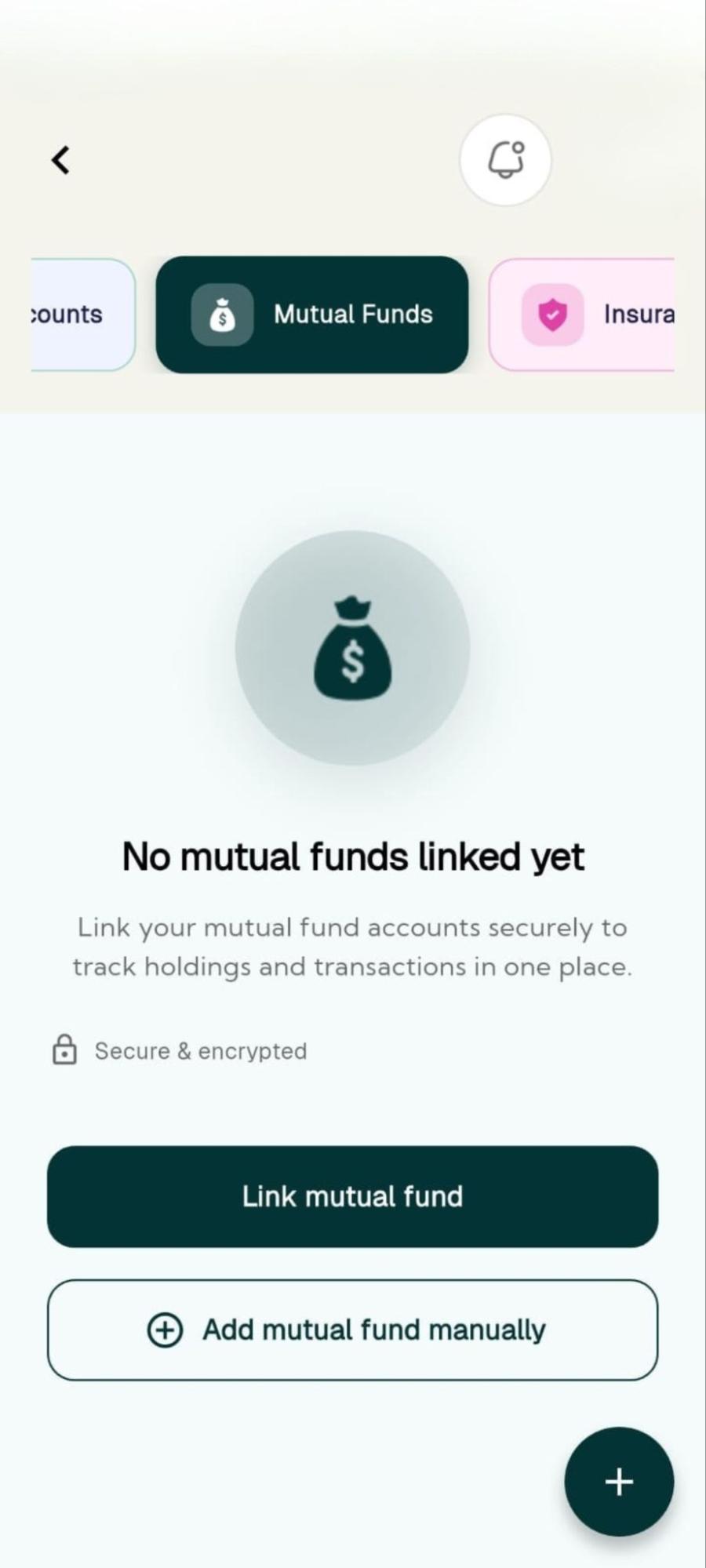 You can link bank accounts, stock providers, mutual fund providers, and insurance policies through a consent-based Account Aggregator. If a supported connection is unavailable, the platform also lets you enter the record manually.
- Connect supported financial institutions
- Add unlinked records manually
- View, edit or remove manual entries
This dual method helps users build a more complete financial record without relying entirely on automatic account connections, leaving no detail outside your 1FCode profile, and nothing for your family to hunt for later. You can also review how 1FCode handles your information before connecting your financial records.
Step 3: View the Unified Dashboard
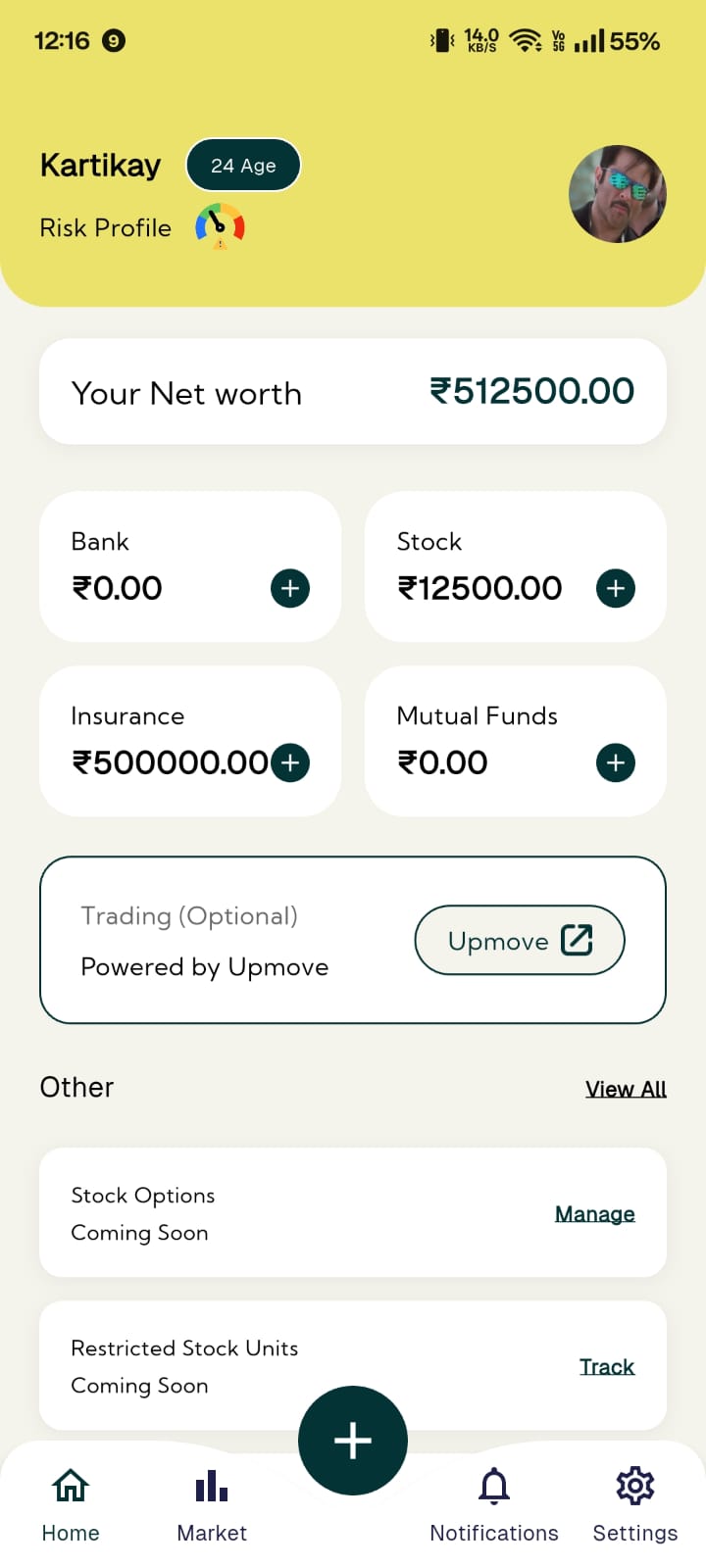 Once records are linked or added, 1FCode organises their values on the main dashboard. You can see your bank balances, stocks, mutual funds, and insurance are displayed separately.
- Overall net-worth view
- Category-wise financial values
- Combined investment portfolio
The dashboard serves as the central hub where you, and eventually your family, can review the financial information recorded across your accounts.
Step 4: Add Your Nominee and Will Records
 Your financial profile can then be expanded beyond account values. You can complete the quiz, add nominees with intended allocation percentages, and upload your latest signed will. These details help turn the profile into more than an investment summary.
They also record the personal and family information connected with your finances, the part that matters most when it’s needed.
Step 5: Review and Take Action
As your finances change, you can return to linked and manually added records to review or update them. You can also raise a support ticket, use the adviser option or start an SOS Emergency request when a relevant financial institution needs to be contacted.
What Are the Benefits of Using 1FCode?
1FCode isn't only about organising your own finances. It's about helping the people you leave behind avoid having to piece things together.
- See the whole position, not just the portfolio. Bank balances, holdings, insurance and estate records sit together, which is how your family will need to see them.
- Notice gaps before they become urgent. Missing holdings, incomplete policy records and outdated nominee details become easier to identify during a routine review.
- Decide with the full picture in front of you. Category-wise values, net worth and your risk profile give you something to work from before you change an investment, a policy, or a nominee.
- Reduce dependence on one person’s memory. Keeping nominee information and Will details recorded creates a clearer reference for you and your family.
- Reach the appropriate support. Access insurance assistance for hospital selection, documentation and the claim process, along with support tickets, adviser guidance and SOS Emergency.
What Does the ₹365 Annual Subscription Provide?
Creating an account on 1FCode is completely free. Subscribing to the ₹365 annual plan unlocks full access to all platform features, including:
| Features | What the ₹365 Annual Plan Includes |
|---|---|
| Dashboard | One-year access to the dashboard and the record-management features included in the plan. |
| Investments | Tracking and analysis for supported investment accounts and holdings. |
| Insurance | Policy management and access to insurance-related assistance. |
| Loans and Accounts | Tools for monitoring loans, cards and deposits. |
| Tax Support | Tax-filing and advisory services. |
| Net Worth and Risk | Net-worth view and risk-profile tools. |
| Estate and Family Records | Estate-planning tools, nominee and Will records, and family-vault features. |
| Guidance and Support | Access to expert CA or CFP advisory calls and priority support. |
1FCode Brings Legacy Planning Into One Place
Managing your finances shouldn’t feel like a full-time job, and preparing your family for what comes after shouldn’t feel like an afterthought. Most people don’t regularly check their full financial position, not because they don’t care, but because pulling it together takes more effort than most days allow.
1FCode brings legacy tracking, legacy protection, and legacy planning together behind a single login on your phone. Your money, your protection, and what your family will eventually need all sit in one place, so there's less for them to search for later.
Get the 1FCode App on Google Play or the App Store.